
Two years have gone by and suffice to say, we're all still coding, and new IBM Planning Analytics v12 clients and models are rolling out just fine.
The conversation we're going to have here isn't about the impact of the missing functions. It's about what you need to consider to benefit from everything IBM Planning Analytics v12 has to offer, and why most of that work can (and should) start on your current v11 environment.
The big one
v12 comes with a long list of new features, but the biggest one is probably High Availability (HA). For large IBM Planning Analytics implementations, HA was never considered a feature; it was a necessity. In many situations we had to help customers find ways around internal IT requirements simply because IBM Planning Analytics didn't historically offer this feature out of the box. Importantly, HA isn't only solving the high availability question, it also improves query performance by distributing queries against a TM1 database across multiple replicas.
About replicas
This is where the considerations start. Replicas are set per TM1 database. If your model is currently sitting at 500 GB, enabling HA means you need at least 1 TB of RAM. That obviously comes at a cost and, in today's AI era where memory prices are climbing and lead times are stretching, it isn't a minor one.
So, the question becomes: what can you do to enable HA without doubling your memory footprint and costs?
Setting up the baseline
There are multiple culprits for high RAM usage in an IBM Planning Analytics model. The good news is that the most impactful ones are fixable, and the first two don't need anyone's approval.
Optimize your dimension ordering
Dimension reordering is probably the change that will save you the most RAM, and the best part is that it happens at zero cost. You can use OptimusPy to find the optimal dimension order for each cube; depending on your starting point you can save anywhere between 20% and 70% of RAM. No code changes, no rewriting anything, the memory is simply gone. This doesn't only reduce your hardware requirements (less RAM, and a smaller disk footprint as well), it also improves user experience because the median query time drops when the engine can read and write more efficiently. Startup time improves too, since there's less work involved in loading each cube into memory.
Review resource-demanding rules
The easy path
Once you've reduced the memory footprint via dimension reordering, you can switch to your rules. Just like any performance improvement plan, start by measuring your current state, which }StatsByCube will give you. Once you know your starting point, you can apply the rules best practices we've published here.
This is where we turn the page from non-invasive changes to the ones that require getting our hands dirty.
The tricky one
Now we need to sit down and understand where the bottlenecks are. Using }StatsByRule, spot the lines in your rules that consume the most resources to compute. Once identified, you'll need to get creative. Multiple nested IF statements? Consolidate them into one cell. References to string-based attributes? Think about which component of the conditional has the highest probability of being true so you can check that first and act on it. Are there rules against Actuals? Why is that the case? Does the actualization of your forecast happen via rule?
Once you've reworked some of this, go back to the feeders and reassess which ones are still needed. Try to implement feederless rules wherever possible. Here is a guide we built to better understand how feeders can be set.
So far, we've been able to work without significant code changes and, above all, with minimal stakeholder involvement. This is as far as we can go without them.
Architecture review
Before we knock on the executive stakeholders' door, let's review what we actually have in the IBM Planning Analytics application. Below is a list of common patterns we see across many customers; you could be affected by one or more of these.
Multi-domain. Your IBM Planning Analytics application is designed to serve several domains of the company: manufacturing, sales, HR, HQ, and so on. Some dimensions are the backbone of your model and are used by all of them, and you (or someone before you) decided it was best to keep everything in the same model.
Multi-module. Your IBM Planning Analytics application has a workforce module, a capex one, a P&L, a balance sheet, a cash flow, etc. All of them in the same application, probably for the same reason as the multi-domain case: they share dimensionality and one feeds the other, so it felt right to have them handy in the same model.
Multi-workflow. Your application supports monthly forecasting, which happens year-round. It also supports budgeting, which happens during two or three months of the year, as well as long range planning (LRP), which is also worked on for two or three months but at a different time of the year. It made sense to have them all together since you build your budget from your last forecast and then adjust the forecast every month as actuals come in. And the first year of the LRP might well be the baseline for next year's budget.
Why are these patterns a problem? There are multiple answers, but to narrow it down:
- Maintenance. Since these models tend to share TM1 objects (cost center, accounts, scenarios, periods, etc.) you're inherently constrained when updating them: you'd either break another module or create unnecessary objects for it. Testing is impacted too, since a change in one place might affect functionality everywhere else.
- User experience. As we move to PAfE and PAW based workbooks as the primary IBM Planning Analytics UIs, consider that MDX is king. All data requests from either tool are REST API calls with MDX inside them, and some MDX is going to cause locking in many cases. When a user is building a report in one module that contains the period dimension, another user might get blocked when inputting values into a cube that uses the same dimension (a silly example, but it gets the point across).
- Downtime. What if you need downtime to make an invasive change to one module? All the others go down with it, and you're affecting them without giving anything back.
- Startup and recovery. The whole application must be loaded before anyone can use any part of it. A model that takes forty minutes to start up because of a heavy budgeting module penalizes the monthly forecast users every single time, even though budgeting isn't running. The same goes for a restore you can't bring back just the piece that broke.
- Security and ownership. One security model must satisfy every domain at once, so }ElementSecurity and the groups behind it grow to cover every combination somebody once needed. Nobody quite owns the shared dimensions anymore, because everybody depends on them.
- Sizing. You're forced to provision for the sum of everything, all year, because there's no way to run part of it. This one is minor in v11. It becomes a main story in v12, and we'll get to that.
Modularization
Slicing a monolithic IBM Planning Analytics instance is not an easy task and not always needed. The first step of the process is to come clean with your stakeholders: you'll need time and budget to get this done. The good thing is that it gives them a chance to shape the modularized IBM Planning Analytics instances to fit their updated needs.
Contrary to general belief, modularization doesn't mean that business users need to change the way they work. If we plan and architect this the right way, the changes should go unnoticed; the only thing they should notice is a boost in performance.
A good starting point for modularization is understanding which workflows and domains are independent from one another. Understand as well that using the same (or a similar) dataset doesn't mean they depend on each other; it just means they need to be synced properly.
Understand your calendar: which processes overlap monthly? Which business cycles are needed year-round?
An example
Let's take an application with all three patterns at once: a 500 GB TM1 instance holding finance, sales, manufacturing and HR (multi-domain), with P&L, balance sheet, cash flow, workforce and capex modules (multi-module), supporting a monthly forecast, an annual budget and a long range plan (multi-workflow). Numbers are illustrative, but the shape is one we see often.
The first two steps happen before anyone outside the TM1 team is involved:
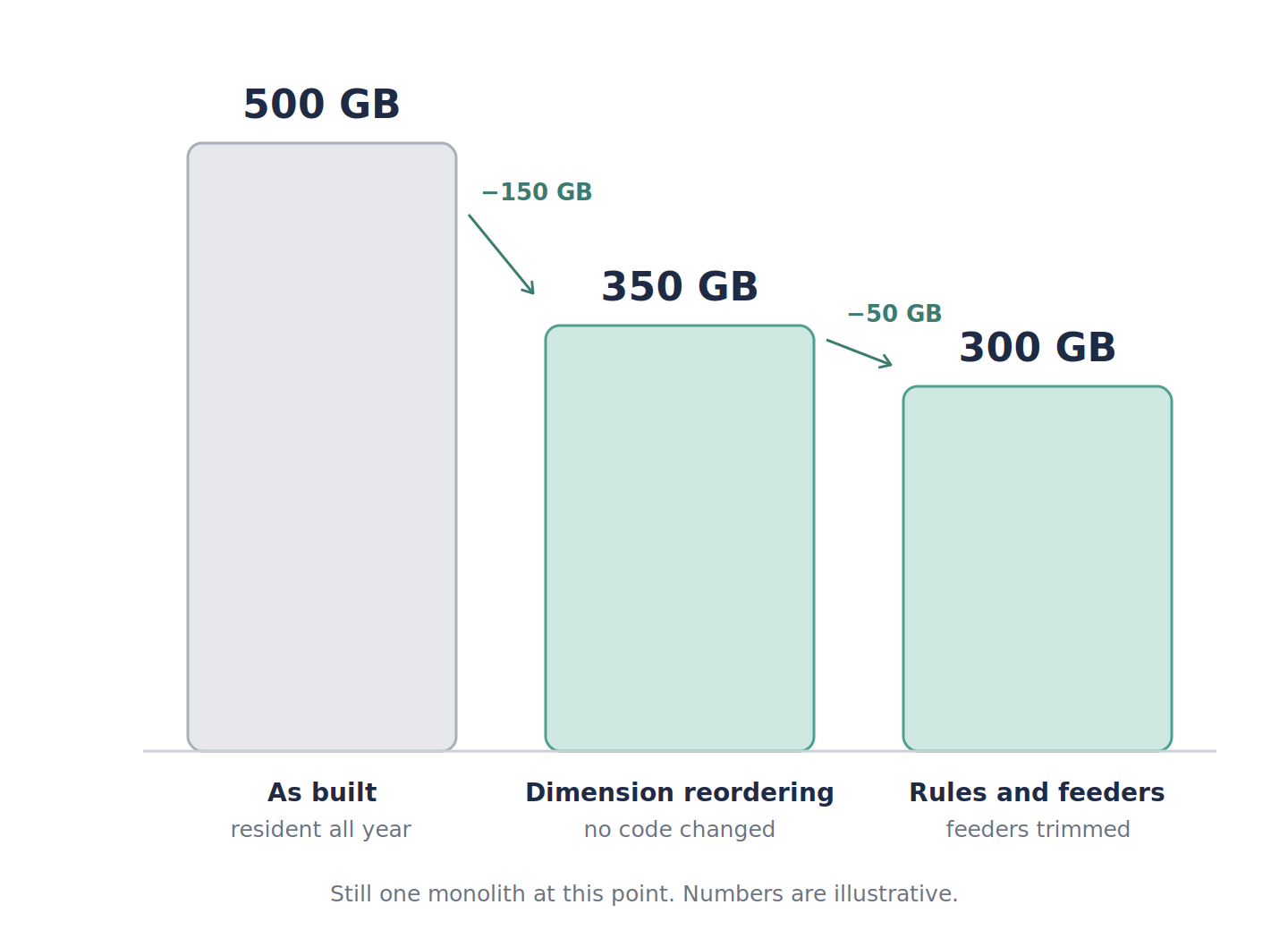
Dimension reordering takes us from 500 GB to 350 GB. That's a 30% reduction, comfortably within the range we see in practice, and it costs nothing. Further optimizing rules and feeder review brings us to 300 GB. At this point nothing about the architecture has changed; it's the same monolith, just a leaner one.
Now we sit down with the executive stakeholders and map what actually runs when:
Which models run when
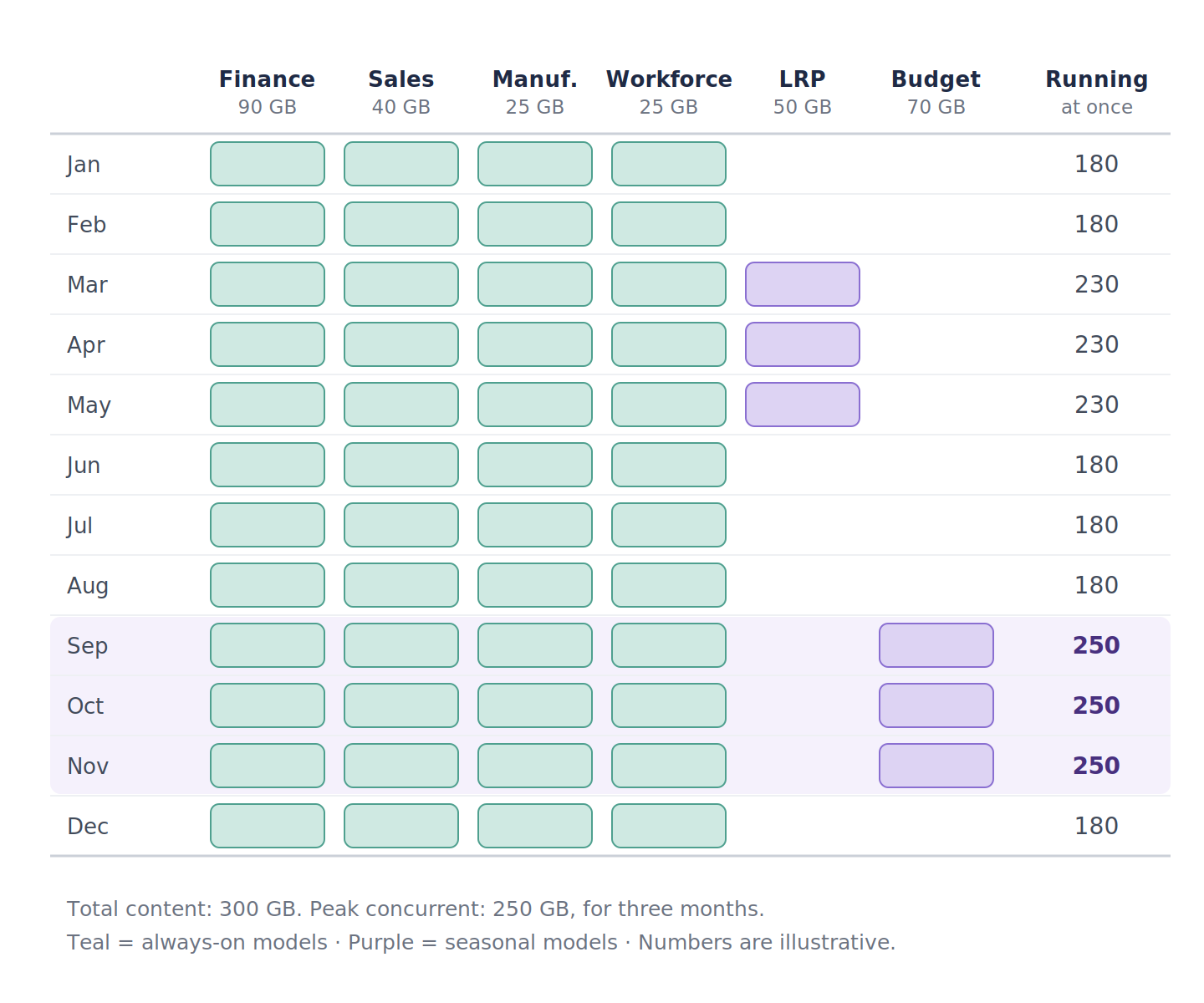
What comes out of that conversation is that finance, sales, manufacturing and workforce are used every month; they're the always-on models, and together they account for 180 GB. Long range planning is worked on from March to May and needs 50 GB while it's live. Budget (with capex folded into it, since that's when capex gets planned) runs September to November and needs 70 GB.
The total content is still 300 GB. But the most that ever needs to be running at the same time is 250 GB, during budget season, and for six months of the year it's 180 GB. Nothing was deleted and no functionality was lost; we've simply stopped paying to keep LRP resident in October and budget resident in April.
One thing to bear in mind is that this only works if the calendar is honest. If budget has a habit of running into December, or LRP starts early, plan for the overlap rather than the ideal. The way to check is to look at when each cycle actually started and finished over the last couple of years, not at the published planning calendar.
How this pays off in v11 on its own
Now, if you've read this carefully you've probably realized the obvious: doesn't this apply to v11 as well? The answer is yes, with a catch we'll get to. But it's worth being clear about what you get right away, because none of it requires waiting for a migration.
The memory reallocation can be real money today. Whether you're on premises or on IBM's cloud, going from 500 GB to 250 GB at peak is a smaller server or a smaller committed allocation, and the disk footprint shrinks with it.
Startup and recovery get faster because each model loads only its own cubes and feeders. The finance team no longer waits for the budgeting module to load in February. If something breaks in the LRP model, you restore the LRP model.
Releases get independent. The sales team can take a change to their model on Tuesday without the workforce team having to test anything. Dimension changes stop rippling across five modules, because the shared dimensions are now synced deliberately rather than shared accidentally.
Locking drops. When the workforce planners are writing and the finance team is running month-end reports, they're hitting different databases. The MDX contention we talked about earlier largely disappears.
Where v11 falls short is on the seasonal part. On premises you can stop the LRP service in June and start it again in March, so the saving is real. On PAoC you can't stop and start instances on demand per se, so the LRP model sits there holding its allocation whether it's in use or not. That's the catch, and it's exactly what v12 can address.
Improving topology to optimize resources
Optimizing resources is always a win, regardless of the application. For IBM Planning Analytics specifically, reordering dimensions and optimizing rules is a win whether you're on v11 or v12. The v12 story, though, comes with a multiplier: your inefficient architecture and over-provisioning will be at least twice as expensive the moment you want HA.
Let's put numbers on the same 500 GB application and see what happens when it moves to v12 with high availability enabled:
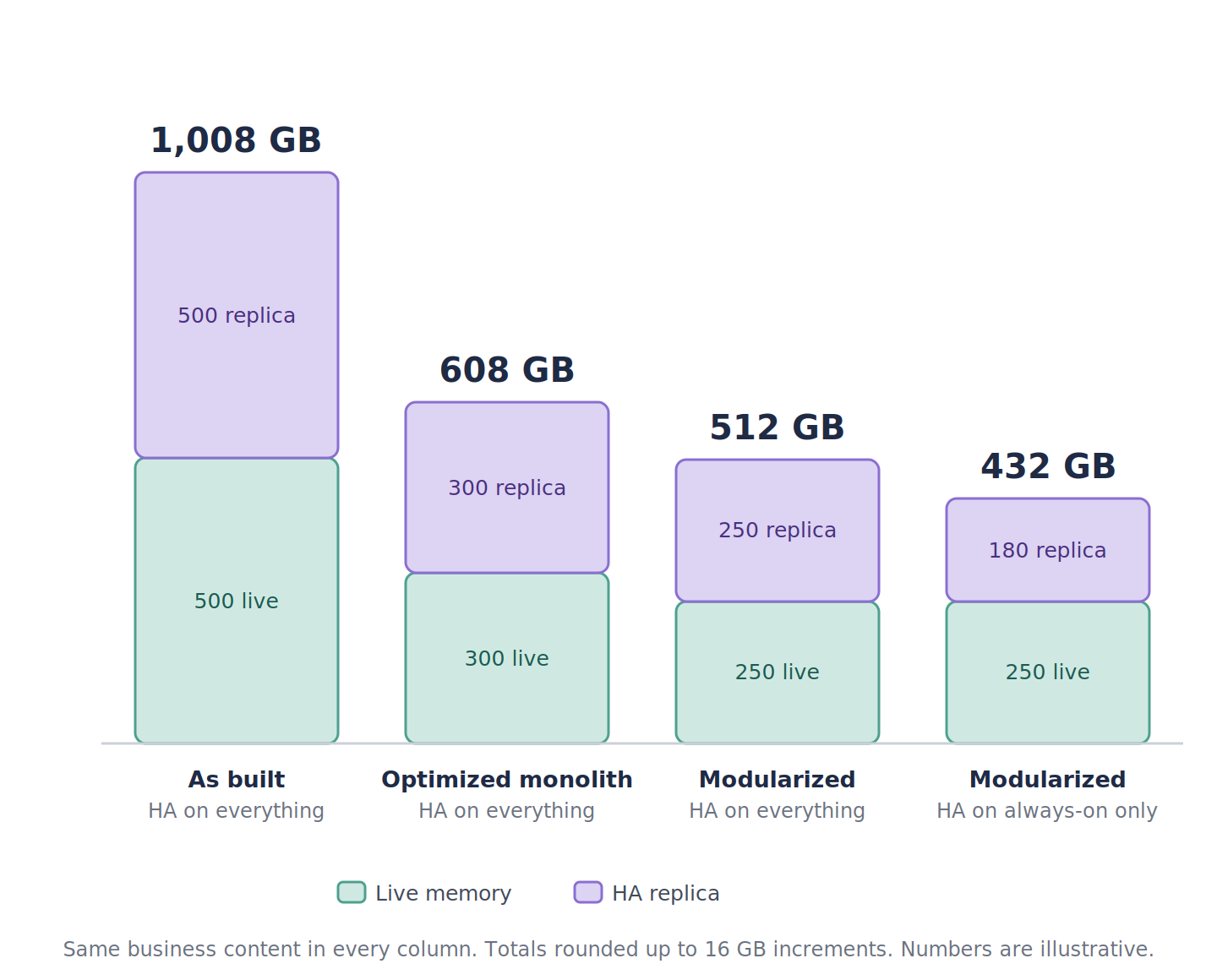
The first column is the cost of doing nothing: lift the monolith as-is, switch on HA, and you're provisioning a terabyte. The second column is what you get from the non-invasive work alone; dimension reordering and rules review, still a monolith, still replicated in full. That's already 400 GB less.
The third column is where modularization starts paying in a way v11 never allowed. Because v12 lets you stop and start databases programmatically and move quota between them, the LRP and budget models genuinely release their memory when they're not running. You provision for peak concurrency, 250 GB, and replicate that.
The fourth column is the one to pay attention to. HA is set per database, which means you get to choose which models need it. The finance, sales, manufacturing and workforce models are used every day and probably do. The LRP model is used by a small team for three months, and if it's unavailable for an hour the business survives. Replicating only the always-on models brings the committed total to 432 GB.
From 1,008 GB to 432 GB, for the same business content, with the same HA guarantees where they matter. And the largest single step in that sequence isn't a clever architecture; it's the dimension reordering we could have done years ago.
Also worth flagging: v12 doesn't support overage of any kind. If two seasonal models happen to overlap and the total would exceed your quota, the second one won't start. That isn't a billing surprise, it's a hard stop in front of the budgeting team on a Monday morning. It's one more reason to be honest about the calendar before you size anything.
Start in v11 to finish in v12
Here's the way I'd think about it. v12 is like summer: it's coming whether you're ready or not. You can start working out in autumn at your own pace, or you can rush everything in spring knowing you might not make it in time.
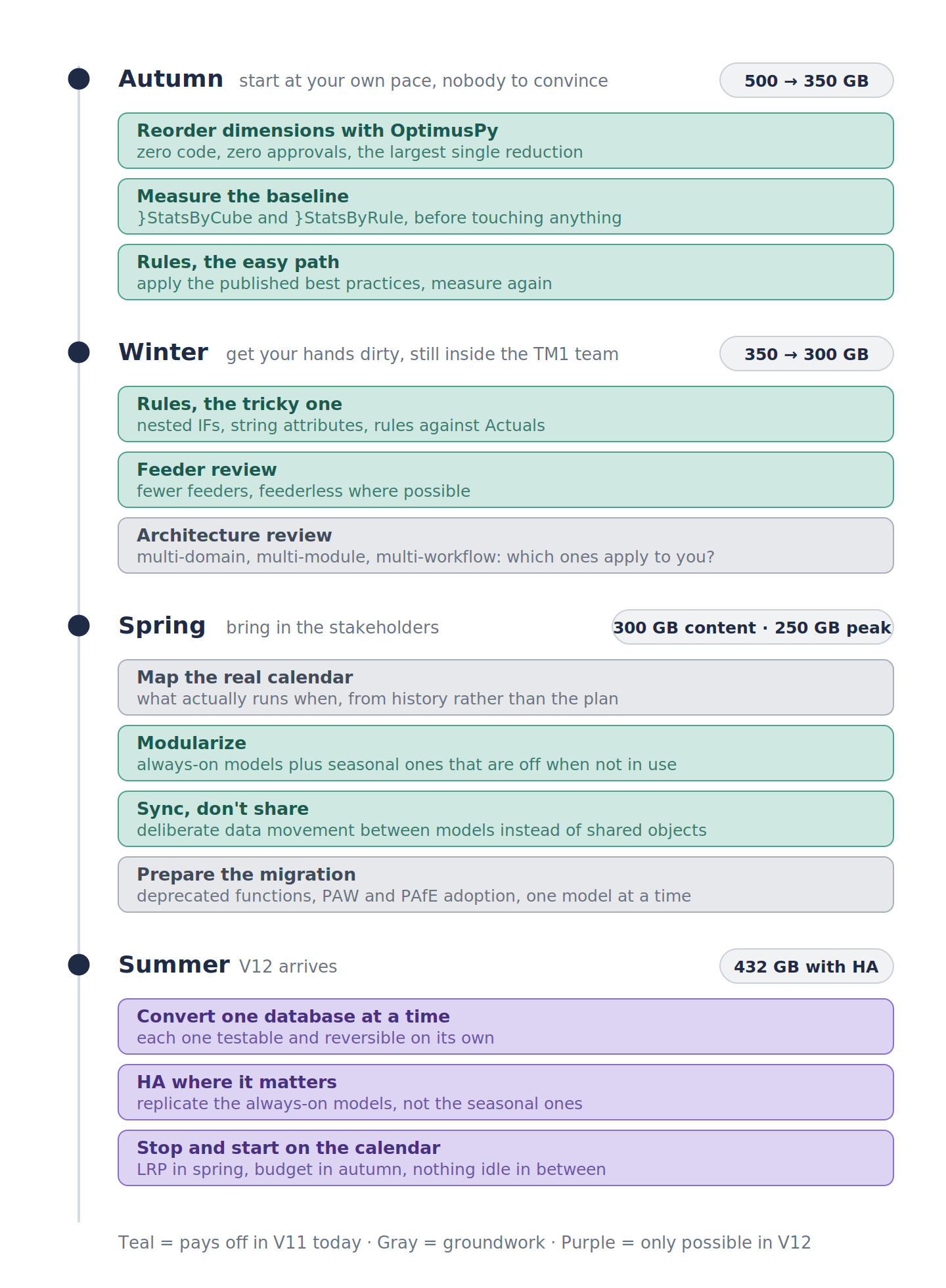
Autumn and winter belong to the TM1 team alone. Dimension reordering, measuring, and the two passes over rules and feeders take the 500 GB application down to 300 GB without anyone outside the team needing to approve a thing. Every step pays off the day it's done.
Spring is when the stakeholders come in, because modularization needs their calendar and their budget. The thing to notice is that by the time you have that conversation, you're proposing to restructure a lean 300 GB model rather than a 500 GB one, and you've already shown results. That's a very different meeting.
Summer is the migration itself, and it's short precisely because of everything before it. A set of smaller models converts one at a time, each on its own schedule. HA goes only where the business needs it. And the seasonal models start and stop with the calendar instead of sitting idle for nine months with a replica beside them.
Dimension reordering and rules optimization will pay off in v11 for sure; we've been doing that for years at many customers. Modularization was harder to justify in v11, especially on PAoC, because you couldn't act on the calendar even if you understood it. v12 changes that, and it also raises the price of not doing it, because whatever waste you carry forward gets replicated.
That's why we'd recommend that the path to v12 starts with optimizing v11. It's an investment that pays off immediately rather than in twelve months when the new version arrives, and it means that when the migration does come you're converting a lean, modular set of models rather than a monolith.
If this topic is of interest to you, I encourage you to join me and the Cubewise team at IBM TechXchange 2026.